
Using AI Well
Safe, ethical, and responsible AI for Policy & Ops
- Presenter
- Jo Flores
- Session
- 1 of 2
What these two sessions are
We will
- Learn what these tools do well, and where they slip
- Name what we want to protect
- Sort safe uses from risky ones
- Next time: practice on your own work
We will not
- Announce a policy or pick a tool
- Promise it fixes your workload
- Use Community Member information
- Get technical
Best practices, not policy. Today: what it is and where the lines are.
Zoom poll
What is a chatbot like ChatGPT or Claude, really?
Answer in the poll. There are no wrong answers.
Over to you
What is the most embarrassing thing you have used AI for?
A birthday message · Getting out of plans · Naming a pet · Arguing with a landlord
AI means tools that create
Counts today
- Chatbots: ChatGPT, Claude, Gemini, Copilot
- Writing help in Gmail
- AI meeting summaries in Zoom
- AI tools in Canva
- Translation and image generators
Not today
- Search
- Spellcheck
- Autocorrect
When it writes, summarizes, translates, or draws, you’re using AI. Let’s use it well.
What is a chatbot?
You type. It types back.
Always
- Guesses the next words
- Does not check whether it is right
Sometimes
- Searches the web
- Reads a document you give it
- Reaches files it has been connected to
“Where did this come from?” Ask every time.
Very fancy predictive text
Thanks so much for helping with the fundraiser. We couldn’t have done it without you
- your
- yours
- you’re
- Your phone guesses from the last few words
- This one guesses from most of the internet
As good as what it read
- Some of it is textbooks and journals
- A lot of it is Reddit
- Nothing tells you which you just got
Plays whatever part you give it
“You are a grant writer for a community nonprofit.”
It is really good at improv
The first rule of improv: never turn down an offer.
- Ask for a bill number → you get a bill number
- Ask for a statistic → you get a statistic
- Same confident tone either way
It is not lying. It is staying in character.
Ask the room
When has one of these handed you an answer you knew was wrong?
Where these tools come from
How they are built
- Trained on huge amounts of writing
- Tuned by people afterward
- Built by a handful of large companies
How they reach us
- Built into software we already use
- Often switched on by default
- Competing to be the tool you rely on
More context: [link to Jo’s one-pager]
Your helper from another world
Treat it like a stranger
- Wouldn’t tell a stranger? Don’t send it.
- Wouldn’t take a stranger’s word? Don’t use it unchecked.
- Check sources, as with Google, Wikipedia, or social media
You are the expert
- AI can do the task
- You know the work, the people, and the stakes
- An expert with AI does much more: an extra set of hands



Your Minion, your Clippy, your Rocky: a lot of help, from somewhere else.
Minions: Illumination. Clippy: Microsoft. Rocky: Project Hail Mary, via Tenor.
The whole session in one line
It drafts. You decide.
Nothing it writes leaves CPC until a person has reviewed it.
A person reviews it
-
1
Before it leaves CPC
Emails, reports, posts and translations all get read first.
-
2
Scaled to the stakes
A quick internal note gets a read. A legislator one-pager gets every fact checked.
-
3
A person answers for it
Not the tool. Whoever sends it.
What counts as adequate review: [definition being workshopped]
We have been here before
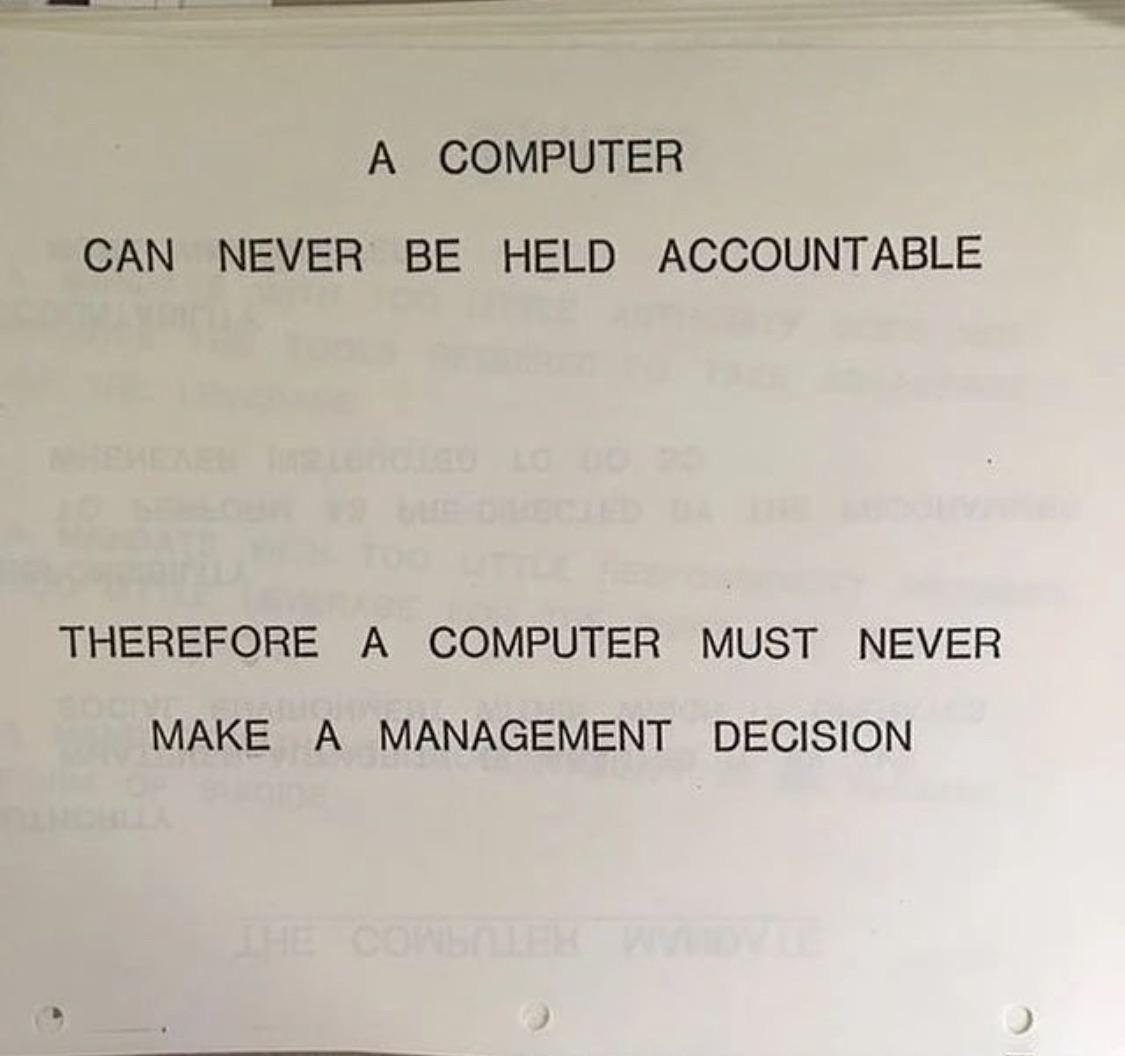
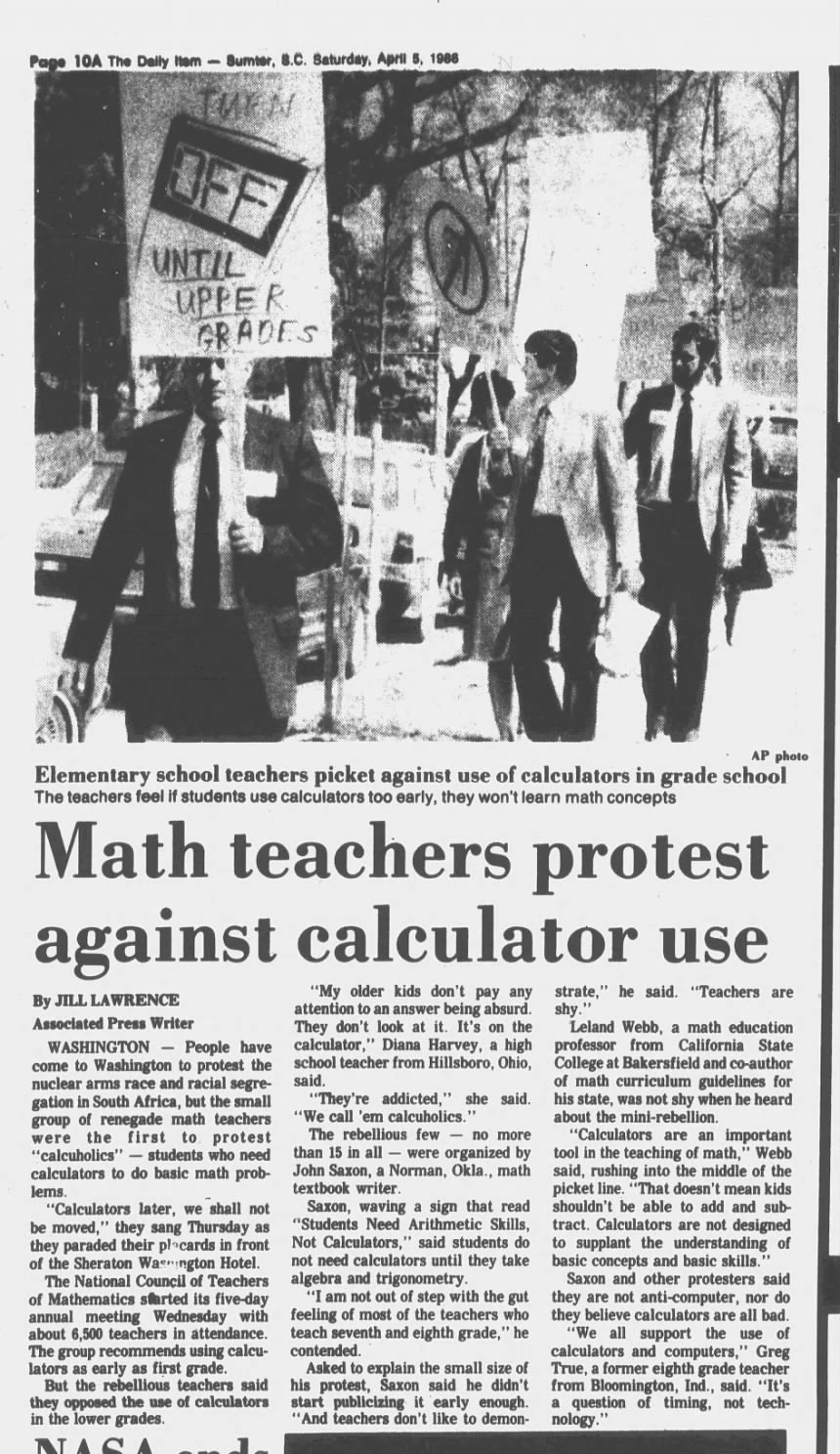
Swap in “chatbot” and both still hold (no edits needed).
What we are protecting
-
1
Our relationships
It can draft the letter, but it cannot be the conversation.
-
2
Our thinking
Judgment is the job.
-
3
Our inner lives
What you type does not stay on the screen.
-
4
Our identities
Faces, voices and names can all be faked now.
-
5
Our work
The worry about being replaced is real.
Five pillars, from the Center for Humane Technology.
Over to you
Which of those five feels most at risk in your work?
Relationships · Thinking · Inner lives · Identities · Work
We protect the people we serve
-
1
Bias
Spot the gaps. It knows our communities less well than it sounds.
-
2
Language
Use it for the gist. Bring in a person for anything binding, in every language.
-
3
Exposure
Keep every Community Member’s details out of AI tools.
-
4
Voice
Let people tell their own stories.
Ask the room
Where have you caught a tool getting our communities wrong?
Used AI? Say so.
Where
- Documents you share with colleagues
- Grant narratives and reports
- Anything public with CPC’s name on it
How
“Drafted with help from an AI tool. Reviewed and edited by [name].”
Saying so is good practice, not an admission. Our fellows already lead on this.
You’re already using it
Email
[A] e.g. writing help in Gmail
Meetings
Zoom’s AI note-taker
Design
[A] e.g. AI tools in Canva
Translation
Generative AI for Spanish
Your phone
[A] e.g. suggested replies
Many of these switched on by themselves. Bring the same lights with you.
Ask the room
Which of these have you tried this month?
Green light
Go for it. No permission needed.
Read
- Summarize a long bill or report
- Explain jargon you ran into
Write
- Rewrite policy language plainly
- Draft a call script or blurb
- Brainstorm talking points
Organize
- Turn meeting notes into actions
- Draw a flowchart or diagram
None of these involve a real person’s information.
Yellow light
Use it, then check it at the source.
Facts
- Dates, numbers, and dollar amounts
- Bill numbers, quotes, and rules
Readers
- Legislators and their staff
- Community Members
- Anyone outside CPC
Language and images
- Translation: a reader checks it
- Images: diagrams, not people
AI drafts. A person reviews it, and answers for it.
Red light: the one rule to take with you
Keep Community Member information out
- Names, addresses, phone numbers, dates of birth
- Immigration or citizenship status
- Case notes, case narratives, or anything from a file
- Benefits, income, or household details
- Health, medical, or mental health information
- Photos of documents
Wouldn’t email it to a stranger? Keep it out of AI.
You can still get help
Skip this
Paste a Community Member’s message and ask how to reply.
Try this
“Help me write a warm, plain-English note inviting someone to our advocacy day, with how to sign up.”
Describe the situation. It doesn’t need to know who the person is.
Your work, sorted
| Research | Advocacy actions | Curriculum | |
|---|---|---|---|
| Go ahead | Summarize a long report or bill | Draft a call script or social post | Outline a workshop or activity |
| Check it | Every statistic, citation, and quote | Bill numbers, dates, legislator names | Anything stating a law or rule |
| Never | Survey or intake data with names | AI-made images, video, or personal stories | Fellows’ personal details |
Ask the room
Where would the last thing you worked on go?
Your work, sorted
| Community-facing | Project management | Data and records | |
|---|---|---|---|
| Go ahead | Plain-language flyer drafts | Meeting notes into an action list | Explain a spreadsheet formula |
| Check it | Every translation, date, and address | Deadlines and who owns what | Any figure it calculated |
| Never | A Community Member’s message pasted in | Staff HR or personal information | Case records, intake data, names |
Questions
And anything you did not want to ask in front of the room
- Follow up with
- hi@joflores.com
- Next session
- Asking well, then hands-on