
AI Basics
A working session for CPC staff
- Presenter
- Jo Flores
What this hour is
We will
- What these tools actually are
- What we want to protect
- What is safe, what is not
- Hands on your own work
We will not
- Announce a policy or a tool
- Promise it fixes your workload
- Touch client information
- Get technical
Over to you
What is the most embarrassing thing you have used AI for?
A birthday message · Getting out of plans · Naming a pet · Arguing with a landlord
What is a chatbot?
You type. It types back.
Always
- Guesses the next words
- Does not check whether it is right
Sometimes
- Searches the web
- Reads a document you give it
- Reaches files it has been connected to
“Where did this come from?” Ask every time.
Very fancy predictive text
Thanks so much for helping with the fundraiser. We couldn’t have done it without you
- your
- yours
- you’re
- Your phone guesses from the last few words
- This one guesses from most of the internet
As good as what it read
- Some of it is textbooks and journals
- A lot of it is Reddit
- Nothing tells you which you just got
Plays whatever part you give it
“You are a grant writer for a community nonprofit.”
It is really good at improv
The first rule of improv: never turn down an offer.
- Ask for a case number → you get a case number
- Ask which rule applies → you get a rule
- Same confident tone either way
It is not lying. It is staying in character.
Ask the room
Has one of these ever given you an answer you knew was wrong? What was it?
The whole session in one line
It drafts. You decide.
Nothing it writes reaches another person until you have read it.
We have been here before
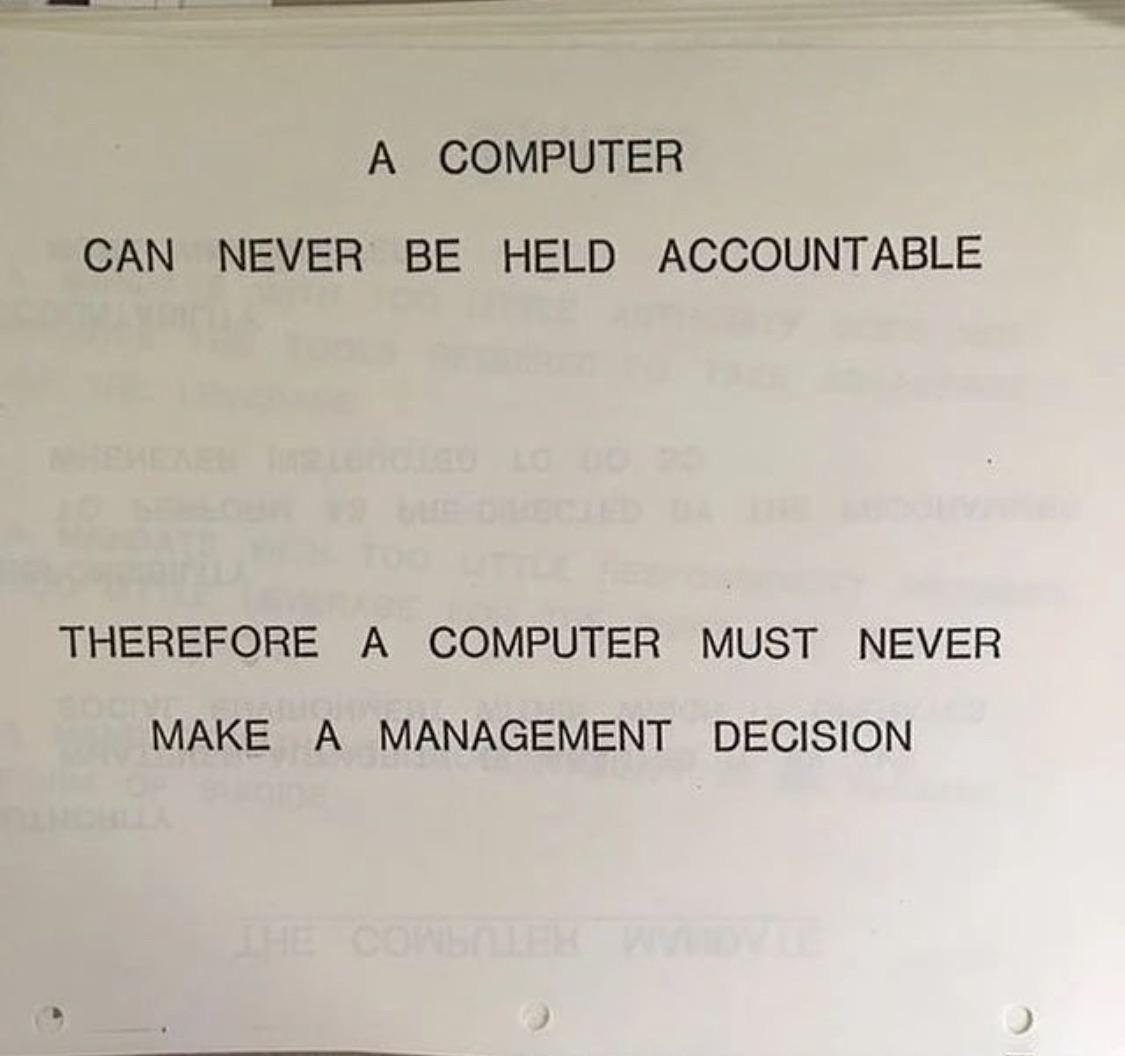
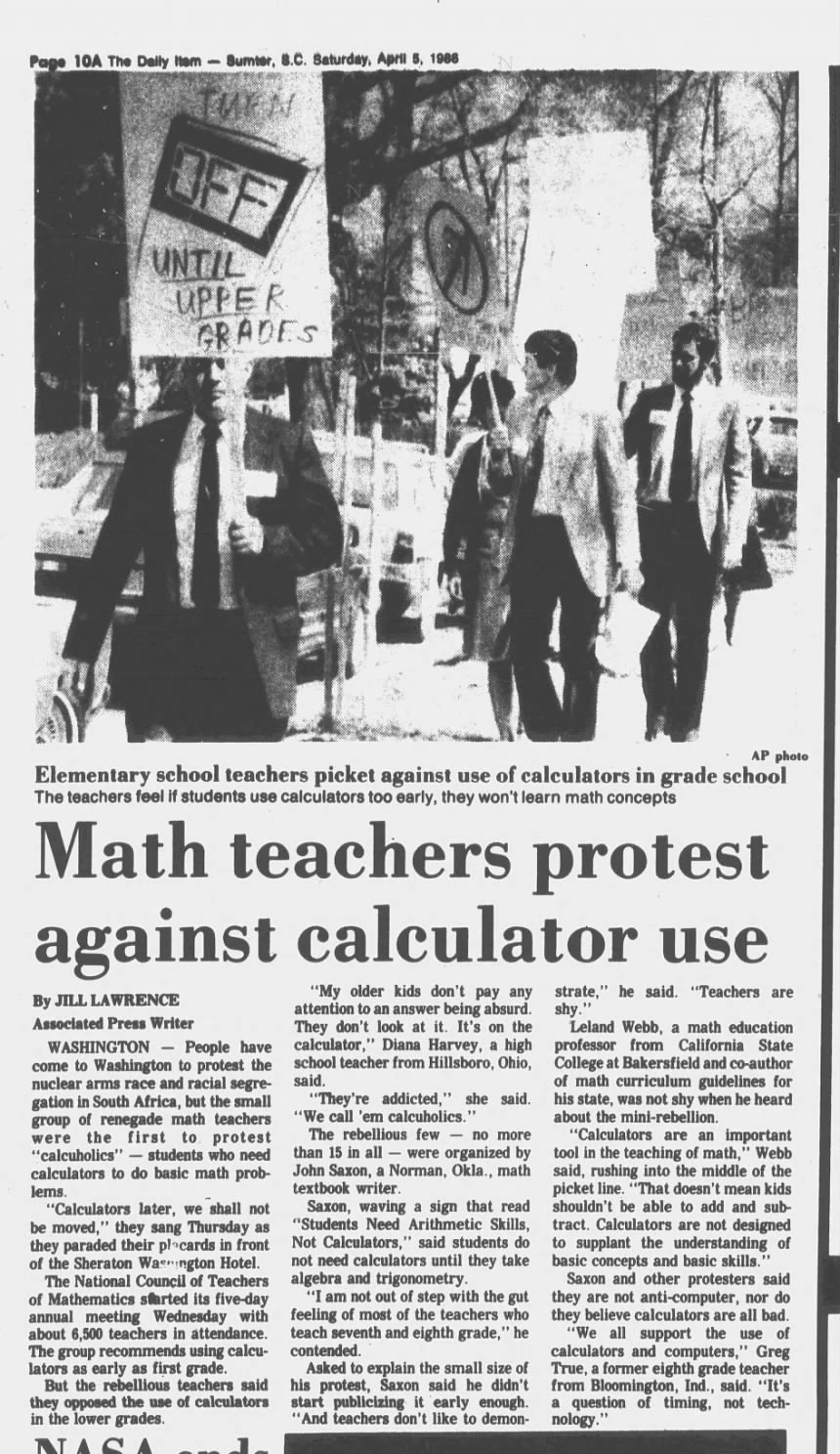
Swap in “chatbot” and both still hold (no edits needed).
What we are protecting
-
1
Our relationships
It can draft the letter, but it cannot be the conversation.
-
2
Our thinking
Judgment is the job.
-
3
Our inner lives
What you type does not stay on the screen.
-
4
Our identities
Faces, voices and names can all be faked now.
-
5
Our work
The worry about being replaced is real.
Five pillars, from the Center for Humane Technology.
Over to you
Which of those five feels most at risk in your work?
Relationships · Thinking · Inner lives · Identities · Work
The main ones
-
ChatGPT
OpenAI
- The most widely used
- Usually the first one anyone tries
-
Claude
Anthropic
- Makes Cowork and Code, on the next slide
-
Gemini
Google
- Built into Google Workspace
- Docs, Gmail, Drive
-
Copilot
Microsoft
- Built into Microsoft 365
- Word, Outlook, Teams
Three ways you will meet it
-
1
Chat
- One window
- Touches nothing else on your computer
Everyone starts here
-
2
Cowork
- Works on your real documents and files
- Carries a job through to a finished deliverable
Built for the work most of this room does
-
3
Code
- Works inside software projects
- Writes and changes code
Built for engineers
Same underlying thing. The difference is how much it can touch.
They are not all the same
Think of it as who you hand the task to.
The bright intern
- Speed
- Fast
- Cost
- Cheap
- Good at
- Simple, clearly defined tasks
- Watch out
- Misses nuance. Struggles when the task is vague
The PhD
- Speed
- Slower
- Cost
- Expensive
- Good at
- Messy, multi-step problems
- Watch out
- Overkill on simple jobs. Can overthink
The product names change. The two questions do not.
You can also tell it how hard to think
Same helper. Two different instructions.
“Give me a quick answer”
- Answers in seconds
- Costs less
- Fine for routine work
- Thinner on hard problems
“Take your time and think”
- Takes longer — sometimes minutes
- Costs more
- Catches more on complicated work
- Can overthink something simple
Quick for routine, careful for anything that matters.
Green light
Go ahead. No permission needed.
- Rewriting something official into plain English
- Summarizing a long document you never finished
- A first draft of routine writing
- Turning messy notes into a clean list
- Brainstorming when you are stuck
- Explaining jargon you ran into
None of these involve a real person's information.
Yellow light
Use it, then check before it goes anywhere.
- Anything with a date, number, or dollar amount
- Anything about program rules or who qualifies
- Translation — fine for gist, not for anything binding
- Anything a client will read
- Anything leaving CPC with our name on it
- Anything you would sign your name to
The tool drafts. A person checks. Every time.
Red light — the one rule to take out of this room
Client information never goes in
- Names, addresses, phone numbers, dates of birth
- Immigration or citizenship status
- Case notes, or anything from a file
- Benefits, income, or household details
- Medical or mental health information
- Photographs of documents
If you would not email it to a stranger, do not type it into a chatbot.
Your work, sorted
| Community events | Legal help | Grant writing | Budgets | |
|---|---|---|---|---|
| Go ahead | Flyer and reminder drafts | Explaining a term to yourself | First draft of a narrative | The justification text |
| Check it | Every date, time, address | Anything a client will read | Every number and claim | Any figure it calculated |
| Never | The attendee list | Status, case notes, names | Client stories with detail | Anything not yet public |
Ask the room
Where would the last thing you worked on go?
You can still get help
Do not
Paste the case note or the client's message and ask what to write back.
Instead
"Help me write a warm, plain-English letter telling someone their appointment has moved, and how to reach us with questions."
It does not need to know who the person is.
Group A
Draw a tree.
Group B
Draw a lemon tree.
Same room. Same thirty seconds.
Group A — “draw a tree”
Three different trees. You each reached for your own.
Group B — “draw a lemon tree”
Three of the same tree.
The difference between these two columns is two words.
You type
“Tell me a story”
-
Fairytale
A miller’s daughter is locked in a room of straw and told to spin it into gold by morning.
-
History
In 1969, two men land on the Moon while six hundred million people watch on television.
-
Personal
My grandmother taught me to fold dumplings. I have never once matched her pleats.
All three are correct.
You add
“I meant a story about your weekend”
-
An errand
I finally cleared the boxes out of the hallway. Two trips to the donation bin and most of Saturday.
-
A wedding
My cousin got married in a fire hall in New Jersey and the DJ played the same song twice.
-
Nothing much
Nothing happened. I watched four episodes of something I will not remember by Tuesday.
Four words ruled out fairytales and the Moon, and still left three different weekends.
You add
“I meant a story about your Sunday afternoon”
-
A walk
I took the long way back from the market because the light was good.
-
A nap
I fell asleep reading on the couch and woke at six not knowing what day it was.
-
A phone call
I called my mother and we talked about nothing for fifty minutes.
Specific does not get you one answer. It gets you a smaller range.
Asking well: four parts
- 1
Who it is for
“This is for a flyer for adults reading English as a second language.”
- 2
What you want
“Write three short versions of a paragraph explaining what to bring.”
- 3
The limits
“Under 60 words. Warm but not chatty. No jargon. Do not invent dates — leave them blank.”
- 4
An example
Paste something that already sounds right: “match this.”
Your turn — ten minutes
Pick one real thing. Use all four parts.
- Rewrite a program flyer into plainer English
- Summarize an RFP into what it actually requires
- Draft a run-of-show for your next community event
- Tighten a grant paragraph from 200 words to 120
- Draft the justification text for a budget line
- Turn last week's meeting notes into an action list
Green light only. No client information.
What CPC has to decide
Which tools are approved
Personal and organizational accounts have different data terms.
The data rule, in writing
A written rule staff have read is what holds up.
Who to ask when unsure
A named person beats a document nobody can find.
Whether we say when we used it
On grant narratives. On shared documents. With each other.
What gets checked before a client sees it
Especially translation, and anything stating a rule.
Ask the room
What would have to be true before you would trust this with something a client reads?
Five things to take with you
- 1
It drafts. You decide. Nothing goes out unread.
- 2
No client information. Ever. Describe the situation instead of pasting it.
- 3
Keep the relationship human. It can write the letter. It cannot be the conversation.
- 4
Keep thinking. Read what it gives you, then form your own view. Judgment is the job.
- 5
Check every fact, number, and rule at the source — not by asking it again.
Questions
And anything you did not want to ask in front of the room
- Follow up with
- hi@joflores.com
- Further reading
- humanetech.com